
Roles & Permissions
Configure User Permissions
You can choose to:
- Select from a set of predefined user roles tailored to common use cases
- Further customise permissions for each user individually
To assign a user role, navigate to the User Account and select from the available roles in the drop-down.
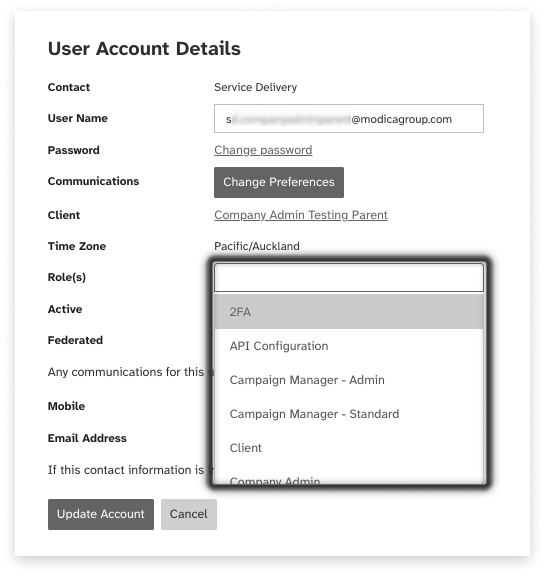
The table below outlines the available permissions across reporting, message content, application features, and integrations. Each permission can be enabled or disabled individually, giving you full control over what each user can access.
User Roles
| User Role | Definition | Number of Permissions |
|---|---|---|
| Company Admin | Enables full control over users, contacts, and role-management across both your account, and any accounts underneath (child-accounts) | 13 settings |
| Mobile Report | Access to Mobile Report, which includes key message transaction information such as timestamps, source, destination number and more | 2 permissions |
| Message Content - View Only | Ability to view message content on-screen (but not download) across all platform systems | 8 permissions |
| Message Content - View and Download | Ability to view AND download message content from all platform systems | 16 permissions |
| API Configuration | Grants access to API Configuration are and the ability to modify MO callback configurations and settings | 3 permissions |
| 2FA | Provides access to 2FA configuration | 1 permission |
| Campaign Manager - Standard | Access Campaign Manager and send messages | 1 permission |
| Campaign Manager - Admin | Full admin access to Campaign Manager, including deletion, email forwarding, and user-log visibility | 6 permissions |
| Email2SMS - Standard | Access to the Email2SMS Configuration area | 1 permission |
| Email2SMS - Admin | Admin access to Email2SMS Configuration, including Sender ID dropdown control | 3 permissions |
| Mobile Studio - Standard | Access to Mobile Studio | 1 permission |
| Mobile Studio - Admin | Full Mobile Studio access, including reply functionality and management of keywords and responses | 3 permissions |
| Web2SMS - Standard | Access Web2SMS and send messages | 1 permission |
| Web2SMS - Admin | Grants full Web2SMS access, including sending, admin deletion rights, and settings management | 3 permissions |
Individual Permissions
It is possible to control access at a more granular permission level. Below, we have categorised and provided definitions of each permission, to help you customise your user’s access further.
Reporting
Permissions listed below give access to information related to message sending and reporting.
Mobile Report
Message Content
Message Content permissions give granular control over which users can view or download the content of messages, across different applications.
Message Content - View Only
Message Content - View AND Download
| Permission | Definition |
|---|---|
| Automated Reports - Access message content - all clients | The ability to view message content for messages sent by everyone across all accounts (Parent/Child structure only) – for automated reports |
| Automated Reports - Access message content - my client | The ability to view message content for messages sent by everyone within your account – for automated reports |
| Campaign Manager - View Message Content - all clients | Campaign Manager - The ability to view message content for messages sent by everyone across all accounts (Parent/Child structure only) |
| Campaign Manager - View Message Content - my client | Campaign Manager - The ability to view message content for messages sent by everyone within your account |
| Mobile Report - View message content - all clients | The ability to view message content for messages sent by everyone across all accounts (Parent/Child structure only) |
| Mobile Report - View message content - my client | The ability to view message content for messages sent by everyone within your account |
| Mobile Studio - View Message Content - all clients | Mobile Studio - The ability to view message content for messages sent by everyone across all accounts (Parent/Child structure only) |
| Mobile Studio - View Message Content - my client | Mobile Studio - The ability to view message content for messages sent by everyone within your account |
| Campaign Manager - Download Message Content - all clients | Campaign Manager - The ability to download message content for messages sent by everyone across all accounts (Parent/Child structure only) |
| Campaign Manager - Download Message Content - my client | Campaign Manager - The ability to download message content for messages sent by everyone within your account |
| Email2SMS Detailed Volume Report - Inc Message Content - Download - all clients | Email2SMS Detailed Volume Report - The ability to download message content for messages sent by everyone across all accounts (Parent/Child structure only) |
| Email2SMS Detailed Volume Report - Inc Message Content Download - my client | Email2SMS Detailed Volume Report - The ability to download message content for messages sent by everyone within your account |
| Mobile Report - Download message content - all clients | The ability to download message content for messages sent by everyone across all accounts (Parent/Child structure only) |
| Mobile Report - Download message content - my client | The ability to download message content for messages sent by everyone within your account |
| Mobile Studio - Download Message Content - all clients | Mobile Studio - The ability to download message content for messages sent by everyone across all accounts (Parent/Child structure only) |
| Mobile Studio - Download Message Content - my client | Mobile Studio - The ability to download message content for messages sent by everyone within your account |
Integrations
These permissions give access to view or configure API.
API Configuration
Sending Messages
Control which applications a user can access to send messages, and whether they can edit or configure particular features within.